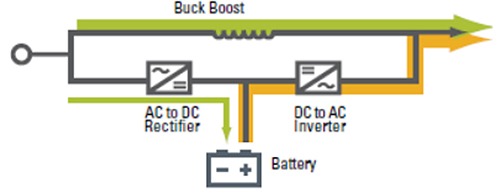
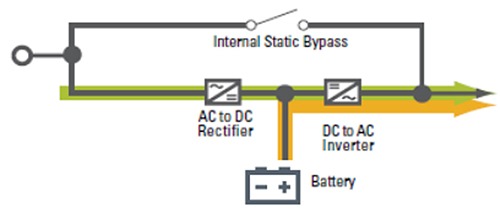
Figure 4: Block diagram of Online/double conversion UPS topology
Hence, we can conclude that Online UPS systems are the best solution for critical loads in smart buildings because they provide seamless and uninterrupted power, ensuring zero switching delays during input failures. The inverter in an online UPS is always active, making it different from other types of UPS. The online UPS inverter delivers a consistent and high-quality power supply to sensitive equipment. The system instantly switches to battery power without delay if the AC power is interrupted, protecting critical devices from uninvited disruptions. Additionally, reliability gets a boost if a battery energy storage system (BESS) is integrated with a bidirectional charger.
| Feature | Offline UPS | Line-Interactive UPS | Online UPS |
|---|
| Working Principle | Powers load directly from mains; switches to battery during power issues | Inverter always connected; regulates voltage and provides battery backup as needed | Continuous double conversion; isolates equipment from power issues |
| Transfer Time to Battery | Typically, 2-10 milliseconds. | Typically, 2-4 milliseconds. | None (zero transfer time). |
| Voltage Conditioning | Minimal; limited protection against power irregularities | Moderate; can correct under and over-voltage conditions without using battery | High; provides clean and stable power regardless of input quality |
| Efficiency | High (typically 95-98%) | High (typically 90-96%) | Lower (typically 80-90%) due to continuous double conversion |
| Surge/Noise Protection | Provides basic surge suppression and line noise filtering | Offers basic surge suppression and noise filtering, similar to Offline, but enhanced by AVR for better voltage stability | Superior protection, as double-conversion isolates equipment from surges, noise, and other AC line disturbances |
| Cost | Low | Medium | High |
| Typical Applications in Smart Buildings | PC Home, Internet workstations, Telephone switchboards, Tills, POS terminals, Fax machines, small groups of emergency lights Industrial and domestic automation | Corporate computer networks, Security systems, Emergency systems, Lighting systems, Domestic and industrial automation | Corporate IT network, Telecommunications, Electromedical sector, Industrial automation, Emergency systems, Protection of dedicated lines, Critical industrial/civil applications, Upstream of power-supply units, Any other possible application |
Table 1: Comparison table summarizing the key points of Offline UPS, Line-Interactive UPS, and Online UPS
Design considerations for UPS in smart buildings
Smart buildings require careful planning - here are the key design factors to consider when evaluating your specific needs.
-
Power quality: Match the UPS output to the load's tolerance. Sensitive electronics need pure sine wave output, while less critical devices may handle modified sine waves. Monitor total harmonic distortion (THD)—so it does not exceed 5% for optimal performance.
-
Load analysis: Calculate the total power demand of critical loads in watts or volt-amperes (VA). Add a 20-30% safety margin for future expansion or inrush currents. For example, a server rack drawing 2 kW requires a UPS rated for 2.5-3 kVA.
-
Availability and battery runtime: The actual runtime needs must be found, as this influences the solution cost. The four basic configurations are:
- UPS with 10-15 minutes runtime without generator (covers 90-95% of outages)
- UPS with 10-15 minutes runtime with generator (reliable setup for most situations)
- Redundant UPSs with generator and dual power feeds (highest reliability)
- UPS with 2+ hours battery runtime (when generators aren't practical)
-
Form factor: Consider space requirements and installation location to determine whether a tower or rackmount model is better suited for your environment. Some UPS units offer 2-in-1 form factors.
-
Scalability: Scalable UPS solutions enable cost-effective capacity increases. Use N+1 or 2N configurations for high-reliability applications. An N+1 setup adds one UPS module beyond the minimum required, while 2N provides a fully mirrored system. For example, a 100 kVA critical load with N+1 might use two 100 kVA UPS units, ensuring failover capacity.
-
Integration with smart systems: Equip UPS units with communication protocols such as SNMP or Modbus, enabling the BMS to monitor real-time battery health, runtime, and load status. Advanced systems even predict failures using AI-driven analytics.
-
Manageability: Power management software ensures work is saved and equipment shuts down gracefully during extended outages. Consider additional capabilities such as:
- Power event notifications (emails, alerts, texts)
- Event logging
- Integration with virtual environments (VMware, Hyper-V, Nutanix)
- Battery monitoring and service notifications
- Remote monitoring by manufacturer service personnel
- Budget: Balance performance features against cost constraints by prioritizing needs for redundancy, scalability, efficiency, software management, modularity, and serviceability.
Conclusion
A reliable UPS is more than a backup system. It is crucial to maintain power stability as smart buildings continue to integrate IoT, automation, and renewable energy. A well-designed UPS shields essential infrastructure from voltage outages, surges, and power fluctuations, from hospitals and data centres to security and automation systems. Investing in the right UPS system minimises downtime, safeguards productivity, and prevents costly disruptions.